Whether a ChatGPT or Claude subscription carries VAT for your UK business depends on three things that have nothing to do with the plan itself: whether you are VAT-registered, which company and country the invoice comes from, and what address and tax ID the account holds. The same £20.00 monthly plan can leave you with a net cost of £20.00 or £24.00, and a VAT return that needs one extra line or none.
This guide is for UK sole traders, freelancers and small companies that pay for AI tools out of the business. It sets out how HMRC treats a subscription bought from a supplier outside the UK, what the reverse charge adds to a VAT return, what an invoice must show before you can reclaim VAT on it, and how a mixed personal and business plan is split for income tax. It reflects the sources linked below as checked on 22 November 2026. It is general information, not tax advice for your case.
What decides the VAT treatment
Three facts decide almost everything.
- Your VAT status. A VAT-registered business can usually recover VAT charged to it, or account for it through the reverse charge and recover it in the same return. A business below the registration threshold cannot recover anything. Current thresholds are on our UK VAT threshold page; this guide does not restate them.
- Where the supplier belongs. HMRC’s general rule for services supplied to a business is that the supply is made where the customer belongs (Notice 741A, section 6.3). For a UK business buying from a supplier that belongs outside the UK, the place of supply is therefore the UK, and the reverse charge applies where the service is not exempt (section 5.1).
- What the provider treats you as. Anthropic’s help pages say that “your billing address determines how taxes are calculated on your Claude purchases” and that the address “should represent the primary place of business receiving the product” (Claude Help Center). An optional Tax or VAT ID field appears at sign-up if the address is eligible (Claude Help Center).
We could not open OpenAI’s help pages on tax IDs and VAT when we checked on 22 November 2026, so this guide does not state what OpenAI charges or which entity invoices you. The method below works for any provider: read the supplier name and address on the invoice, look for a VAT line, and place the invoice in the table.
Four invoices, four treatments
| What the invoice shows | Your status | What the rules say you do |
|---|---|---|
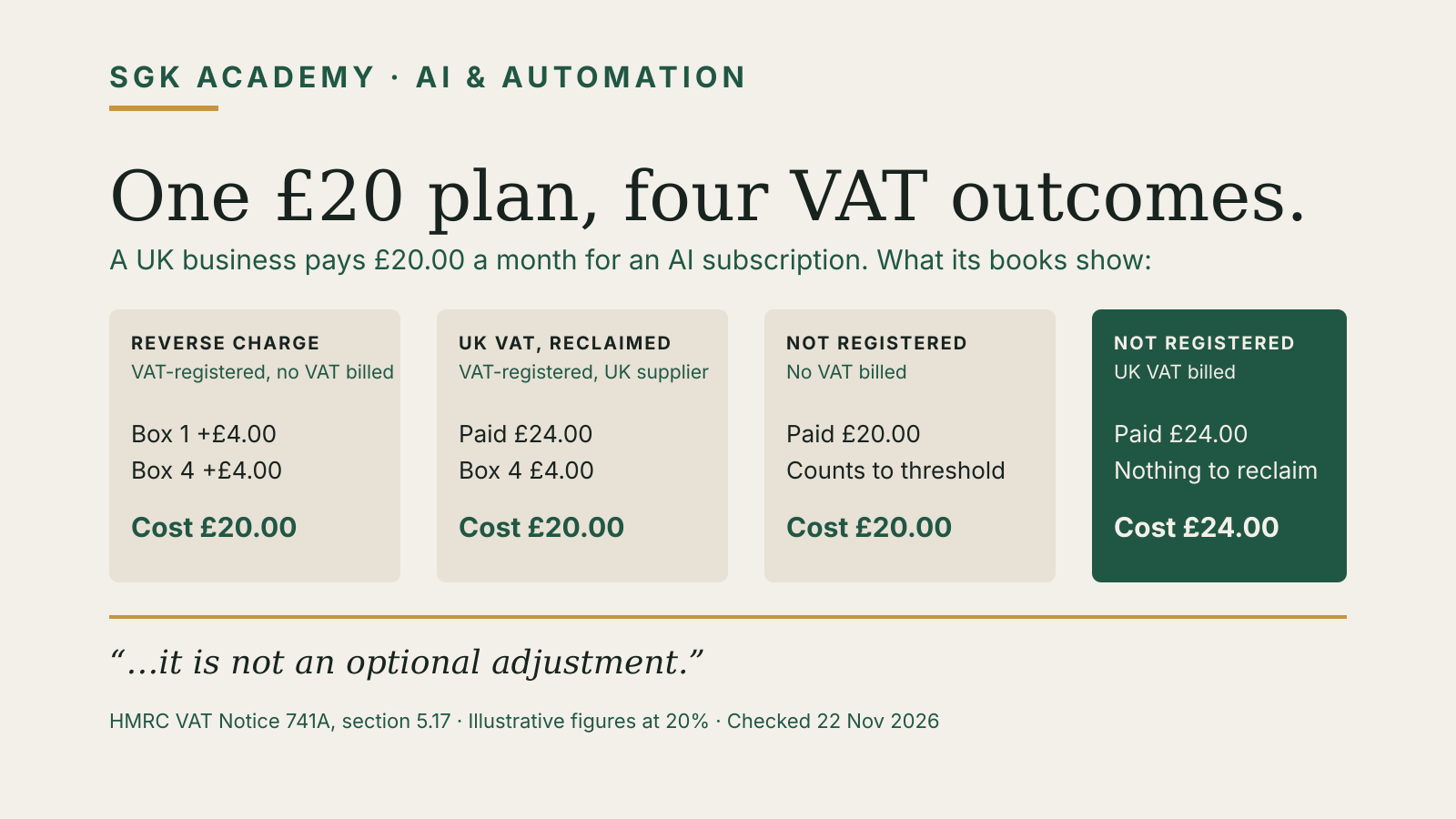
| Supplier outside the UK, no VAT charged | VAT-registered | Apply the reverse charge: output tax in box 1 and the same input tax in box 4, plus the net value in boxes 6 and 7 (Notice 741A, sections 5.2 and 5.12) |
| Supplier outside the UK, no VAT charged | Not VAT-registered | No reverse charge is due, but the purchase counts towards your taxable turnover when you test whether you must register (HMRC manual, VATPOSS14700) |
| Supplier outside the UK, but the invoice carries a UK VAT number and charges UK VAT | VAT-registered | Still apply the reverse charge, and ask the supplier to correct the invoice (Notice 741A, section 5.17) |
| UK supplier charging UK VAT, with a valid VAT invoice | VAT-registered | Claim the VAT as ordinary input tax on the return, subject to the usual rules |
Two points in that table deserve a closer reading.
The reverse charge is not optional. Section 5.17 of Notice 741A says that where a non-UK supplier issues a VAT invoice on a UK VAT registration, “you must still apply the reverse charge as it is not an optional adjustment”. The same paragraph tells you to advise the supplier to amend or correct the invoice. The notice does not say whether the VAT you paid to such a supplier can be recovered on your own return, so treat it as a refund request to the supplier rather than as something to claim in box 4.
Not registered does not mean it does not count. HMRC’s manual says a business that is not VAT-registered does not have to register just because it receives services under the reverse charge, but those services are added to its taxable turnover when assessing registration (VATPOSS14700, updated 24 January 2022). A founder who runs several AI tools and other overseas software should add them to the running total. Use the UK entry in our VAT threshold tool for the current figure.
Worked example: a £20.00 plan over a year
The figures below are illustrative. They use a monthly price of £20.00 before any VAT and the UK standard rate of 20%, and are not a quote from any provider.
| Case | Paid to supplier, 12 months | VAT on the return | VAT you can recover | Net cost to the business |
|---|---|---|---|---|
| A. Registered, reverse charge, no VAT billed | £240.00 | Box 1 £48.00, box 4 £48.00 | £48.00 | £240.00 |
| B. Registered, UK supplier bills 20% VAT | £288.00 | Box 4 £48.00 | £48.00 | £240.00 |
| C. Not registered, no VAT billed | £240.00 | None | None | £240.00 |
| D. Not registered, UK VAT billed | £288.00 | None | None | £288.00 |
The sums: £20.00 × 12 = £240.00; 20% of £20.00 is £4.00 a month, so £4.00 × 12 = £48.00; £240.00 + £48.00 = £288.00. In case A the reverse charge adds £48.00 to box 1 and the same £48.00 to box 4, so the net VAT effect is nil, and boxes 6 and 7 each rise by £240.00. HMRC states the value as the amount paid to the overseas supplier, excluding UK VAT (Notice 741A, section 5.12). In case D, the extra £48.00 is simply part of what the subscription cost you, because there is nothing to claim it against.
The comparison that matters in practice is B against D. The same card payment of £24.00 a month is a £20.00 cost to a registered business and a £24.00 cost to one that is not.
What an invoice must show before you reclaim VAT on it
HMRC’s input tax manual says a claim to deduct input tax “must be supported by appropriate documentary evidence”. Acceptable evidence includes a full VAT invoice meeting Regulation 14 of the VAT (General) Regulations 1995, or a less detailed invoice where the VAT-inclusive value of the supply is £250 or less (VIT31000, updated 4 June 2026). A subscription invoice is normally well under £250 a month, but an annual plan may not be.
A full VAT invoice under Regulation 14 shows, among other things (VIT11500):
- a sequential number and the date of issue;
- the supplier’s name, address and registration number;
- your name and address;
- a description of the service, the rate of VAT and the amount payable excluding VAT;
- the total VAT chargeable, “expressed in sterling”.
The last item matters if a provider invoices in dollars: the VAT amount must still appear in pounds. Our guide to what an EU VAT invoice must show covers the invoice rules in more depth for suppliers and customers; the UK input tax test above is the one for a UK reclaim.
Three practical consequences follow from how the providers describe their own invoicing:
- Fix the name and tax ID before the invoice is issued. Anthropic says updates to billing details “will only apply to future billing cycles” and that “previously completed invoices cannot be updated retroactively” (Claude Help Center). Adding a company name or VAT ID after you have spent a quarter on a personal-name invoice does not repair the old ones.
- Use the invoice name setting. Anthropic says the name and address on an invoice come from the payment method at the time, and that a different name, such as a company name, can be chosen under Settings > Billing (Claude Help Center).
- Avoid app-store purchases for business plans. The same page says that if you subscribe through the iOS or Android apps, Anthropic does not issue invoices and the app store provides the receipts. Whether an app-store receipt meets the invoice test above is for you to check before relying on it.
Provider pages change. Anthropic’s help articles are not dated, so the statements above are as read on 22 November 2026.
Income tax: the business share of the plan
VAT and income tax are separate questions. For a sole trader, HMRC’s guidance says you can claim only for costs related to business purchases, and where an item serves both purposes you “can only claim allowable expenses for the business costs”. HMRC’s own example is a £200 phone bill of which £70 relates to business calls (Expenses if you’re self-employed). The page lists office costs among the claimable items but does not mention software by name, so the test is whether the subscription is a business cost, not the label.
Take a personal plan that you use partly for client work. The figures are illustrative; HMRC does not set a percentage. If you are not VAT-registered and paid £288.00 over the year (case D), and your records support 70% business use, the business share is £288.00 × 0.70 = £201.60 and the other £86.40 is personal. The records are the evidence: a short note of what the tool was used for beats a round number.
If you pay through a limited company, the company’s own expense and payroll rules apply, which this guide does not cover. Our guide to a software asset inventory is a practical place to record which tools the business holds and who pays for them.
A checklist for each AI subscription
- Read the supplier name and address on the latest invoice. Is it a UK or a non-UK company?
- Look for a VAT line. If there is one, does the invoice show a VAT registration number and the VAT total in sterling?
- Add your business name and any VAT ID to the account now, since old invoices cannot be changed.
- If you are VAT-registered and no VAT was charged, put the reverse charge on the return. If a non-UK supplier charged UK VAT, still put it on the return and ask for a corrected invoice.
- If you are not VAT-registered, add the spend to your taxable turnover tally and check it against the current threshold.
- Split a mixed-use plan in writing and keep the note with the invoice.
- Put the tool on your internal list under your AI acceptable use policy, so that whoever pays for it also holds the invoice.
For what the tools cost before tax, see our guide to the cost of an AI workflow. If you are an EU business, the rules differ and are country-specific; our reverse charge guide for EU services is the place to start.