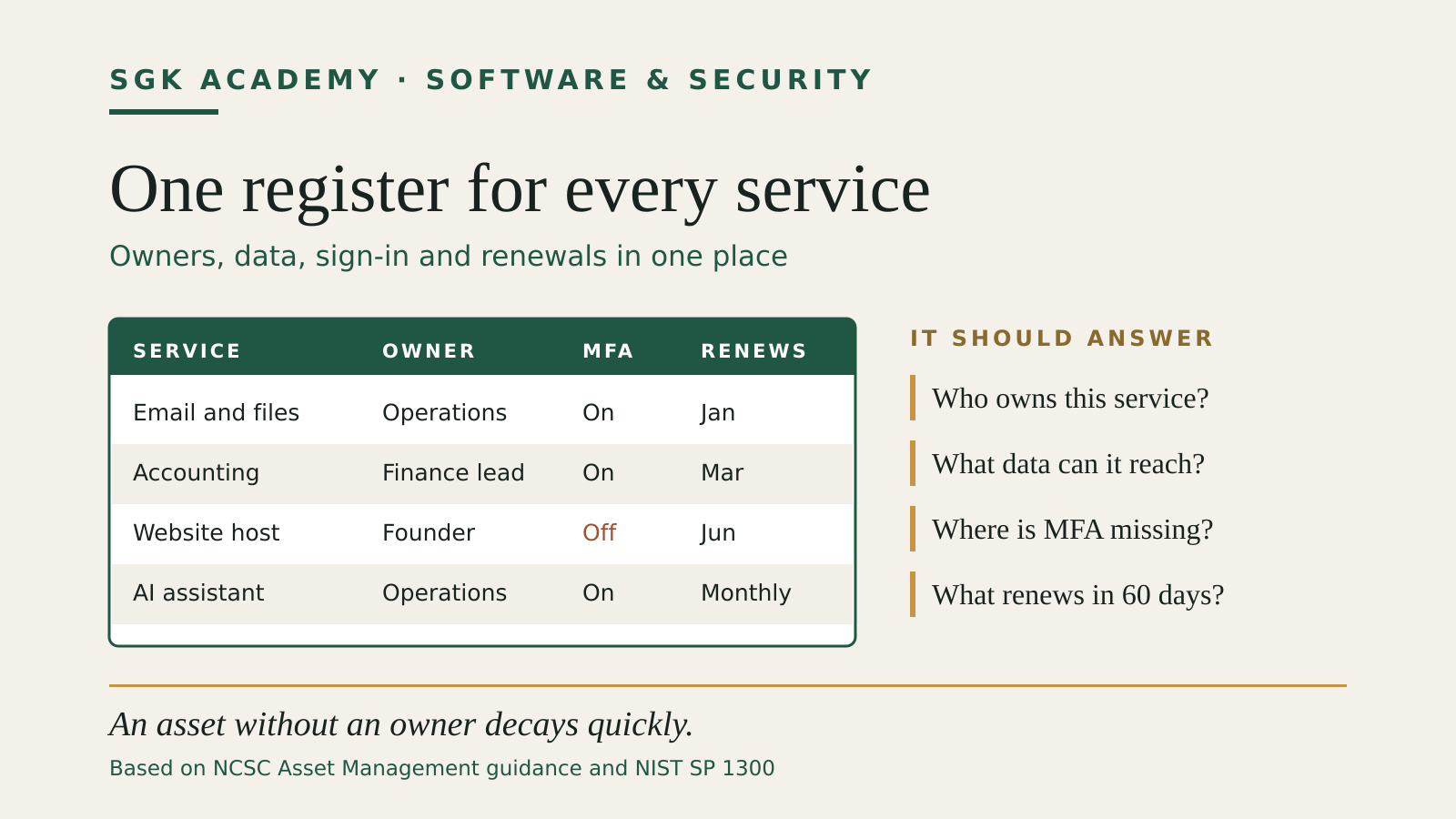
A software asset inventory for a small business is a working record of the applications, cloud services, devices and accounts the company depends on. It should tell you who owns each service, what data it can reach, how people sign in, when the subscription renews and what would happen if access disappeared.
The point is practical control. When a supplier announces a serious vulnerability, an employee leaves or an old card keeps paying for forgotten subscriptions, the inventory gives you somewhere reliable to look. A spreadsheet is enough for many small teams. The value comes from keeping the record current and using it in routine decisions.
Source and version note: This guide was checked on 31 October 2026 against the UK National Cyber Security Centre’s Asset Management guidance, version 1.0, reviewed 28 May 2021, and NIST Special Publication 1300, published February 2024. Both source documents are linked below.
What belongs in a software asset inventory
Start with software and services used for business work, whether the company pays for them or not. Include installed desktop and mobile applications, browser extensions that can read company pages or data, and cloud services such as file storage, accounting, payroll, email and customer support. Add website platforms, domain registrars, DNS providers, certificate services, code repositories, automations, APIs and service accounts. Free accounts matter when they create, store or exchange business information. AI assistants and their connectors belong in the same register; the AI acceptable use policy guide covers which AI uses to approve and who reviews the output.
The NCSC’s Asset management guidance includes hardware, software, virtual infrastructure, information and online accounts. It also warns about shadow IT: business technology that sits outside normal approval and risk processes. A free design account containing client files can matter more than an expensive application with no sensitive data, so purchase records alone will not reveal the whole estate.
NIST’s Cybersecurity Framework 2.0 reference tool defines outcome ID.AM-02 as maintaining inventories of software, services and systems managed by the organisation. Its examples explicitly include commercial software, open-source components, custom applications, APIs and cloud services.
The inventory does not need to list every library inside every product used by a five-person company. Record at the level at which someone can make a decision. If the business develops its own software, a separate dependency or software bill of materials process may be necessary. For ordinary business applications, a record for the service, its owner and its data access is the useful starting point.
The minimum fields to record
A small-business register can begin with ten columns.
| Field | What to write | Why it matters |
|---|---|---|
| Service or software | The product and plan name | Identifies the asset clearly |
| Business purpose | The work it supports | Reveals duplicate and unused tools |
| Owner | One named role or person | Gives changes and incidents an accountable route |
| Administrator | Who can change access or settings | Separates operational control from ordinary use |
| Users or teams | Who currently uses it | Supports access reviews and offboarding |
| Data | The main data types it stores or reads | Helps set protection and retention decisions |
| Sign-in method | SSO, password, passkey or other route | Exposes weak and dependent access paths |
| MFA | Required, optional or unavailable | Shows where a control gap remains |
| Supplier and renewal | Contract owner, renewal date and cost centre | Prevents accidental renewal and abandoned billing |
| Last reviewed | A real review date and reviewer | Makes stale records visible |
Add fields only when someone will use them. A recovery contact, export method, data location, support-end date or criticality rating can be valuable. A large sheet with fifty mostly blank columns will be ignored.
NIST’s Small Business Quick-Start Guide, SP 1300 provides a compact starter table. It asks for the asset’s official use, owner, sensitive data access, MFA requirement and the business risk if access is lost. That last question changes the register from a licence list into a risk tool.
Use a controlled set of values where possible. For example, classify business impact as critical, important or limited, then define the terms. “Critical” might mean the company cannot invoice, pay staff or serve customers for a working day. The label should reflect the company’s real operation, not the vendor’s marketing.
Build the first version from evidence you already have
Do not begin by asking every colleague to remember every tool. Pull together records that already exist.
- Finance records. Review card statements, direct debits, expense claims and supplier invoices for software payments.
- Identity records. Export applications and service-provider connections from the identity platform, password manager and device manager.
- Browser and device evidence. Review managed extensions, installed applications and mobile work profiles.
- Cloud administration. Check the admin consoles for email, file storage, website hosting, code repositories and automation services.
- Domain and web records. List the registrar, DNS provider, hosting platform, analytics account, form service and certificate arrangement.
- Staff confirmation. Give each team the draft list and ask what is missing, including free trials and tools bought on personal cards.
The NCSC recommends combining sources because one source rarely provides complete visibility. Procurement records miss free cloud services. Device tools may miss unmanaged accounts. Authentication and network logs can reveal services that never appeared in an approved purchase process.
For a very small company, manual entry and a regular review may be proportionate. The NCSC specifically notes that manual records can suit a handful of assets, provided someone keeps them current. Automation becomes more useful as the number of devices, services and changes grows.
Give every record an owner
An asset without an owner decays quickly. “IT” is not an owner if nobody in IT knows they hold the decision. Use a named role that survives staff changes, such as Finance Lead, Operations Manager or Website Owner, and record the current person separately if helpful.
The owner should know why the company uses the service, who needs access, which data enters or leaves it, who approves a new integration, how to export records, how to cancel or replace the service and which colleague can recover administration access.
The administrator may be different from the business owner. A finance lead can own payroll while an external IT provider manages authentication. Record both roles so an incident reaches the right people.
For access changes, connect the inventory to the cloud access offboarding checklist. The leaver process should identify every service the person used, revoke sessions and tokens where needed, transfer owned resources and confirm that shared credentials were not left behind.
Record dependencies, not just names
A service can look replaceable until its dependencies are visible. A website may depend on a registrar, DNS provider, hosting account, source repository, deployment key, form processor and email mailbox. Losing one administrator account can block the recovery of several others.
Add a short dependency note for important assets:
- Which identity provider controls sign-in?
- Which mailbox receives recovery messages?
- Which card or bank account pays the supplier?
- Which API keys, bots or automations connect to it?
- Where is the most recent usable export or backup?
- Does another service depend on its domain or data?
This is also where service accounts belong. A person may leave while their API token continues to run an automation. Record non-human access, who owns it and when it was last reviewed.
The password manager guide explains how to plan emergency administration and recovery without spreading shared passwords. The cyber incident response plan covers the wider response record, including evidence, escalation and recovery responsibilities.
Use the inventory for vulnerability and end-of-support decisions
An inventory earns its keep when a security notice arrives. Search the register for the affected product and version, identify its owner, then record the decision: update, mitigate, remove or confirm that the company does not use it.
Versions matter for installed software and managed infrastructure. For cloud services, the supplier usually controls the software version, so the useful questions change. Record the plan, enabled security options, connected applications and supplier status or security notices instead.
The NCSC says accurate hardware and software information supports vulnerability and patch management and helps answer whether a new vulnerability affects the organisation. It also connects asset records to end-of-support planning. A product that no longer receives security updates should have a replacement date or a documented temporary mitigation.
NIST CSF 2.0 outcome ID.AM-05 calls for prioritising assets according to classification, criticality, resources and business impact. A small team can apply that outcome without a complex scoring model. Review critical assets first, then anything internet-facing, anything with financial authority and anything holding sensitive personal or client data.
Review changes at the moments that create them
A yearly clean-up is too slow for a business that adopts cloud tools every month. Put the inventory into existing workflows:
- procurement adds a record before a paid service begins;
- a new integration records its data access and owner;
- onboarding grants only listed tools approved for the role;
- offboarding uses the list to remove access and transfer resources;
- renewal review confirms usage, cost, exports and alternatives;
- incident review corrects missing or inaccurate records;
- project closure removes accounts, tokens, domains and forgotten subscriptions.
The NCSC recommends registering assets before or at first use. It also recommends recording a last-seen timestamp or another indication of staleness. For a manual register, a real last-reviewed date serves the same purpose, as long as review means checking the record against evidence.
Set a practical cadence. Critical services may deserve a monthly check; ordinary software can be reviewed quarterly or at renewal. Review immediately after a major staffing change, merger, platform migration or security incident.
A 60-minute first pass
A founder or operations lead can produce a useful first inventory in one focused session.
Minutes 0–15: list the services that handle email, money, customer data, company files, the website and code.
Minutes 15–30: add each owner, administrator, sign-in method and MFA status.
Minutes 30–45: compare the list with the last three months of software payments, the identity platform and the password manager.
Minutes 45–60: mark critical assets, assign missing owners and schedule the first follow-up actions.
The result will be incomplete. That is acceptable if the gaps are visible and dated. Add a column called “needs checking” instead of guessing. A modest register that supports decisions is better than a polished catalogue that nobody trusts.
Test whether the register works
Choose one realistic question each month:
- Can we identify every service that stores client files?
- Which applications still belong to a former employee?
- Which critical services lack enforced MFA?
- What renews in the next 60 days?
- Which tools use the finance mailbox for recovery?
- Could we find every affected system after a supplier vulnerability notice?
Then compare the answers with billing, authentication or device records. The NCSC suggests looking for stale records, reconciling procurement and cloud billing, and checking whether an unknown device or newly installed application would be detected.
Track corrections as ordinary work. A discrepancy is useful evidence that the discovery process needs another source or that a workflow is being bypassed.
Common mistakes
Treating the register as an accounting list. Purchase records show cost, but they miss free services, personal-card purchases, open-source tools and connected accounts.
Recording only devices. Cloud services, domains, APIs and online accounts can carry the larger operational risk.
Using a shared owner. “Everyone” and “IT” hide responsibility. One role should own each record.
Collecting secrets in the sheet. Record where credentials are controlled. Do not store passwords, recovery codes or private keys in the inventory.
Leaving old records without a status. Mark assets active, being replaced, suspended or retired. Keep enough history to explain a decision, but remove live access and billing when the service ends.
Assigning criticality without a definition. Write down what “critical” means for the company and use the same test across services.
The finished register should answer business questions
A software asset inventory is complete enough when it helps the company act. It should show what the business relies on, who can decide, where important data flows, how access works and which assets deserve attention first.
Keep the register close to procurement, onboarding, offboarding, renewal and incident work. Each of those processes will improve the inventory, and the inventory will make each process faster.