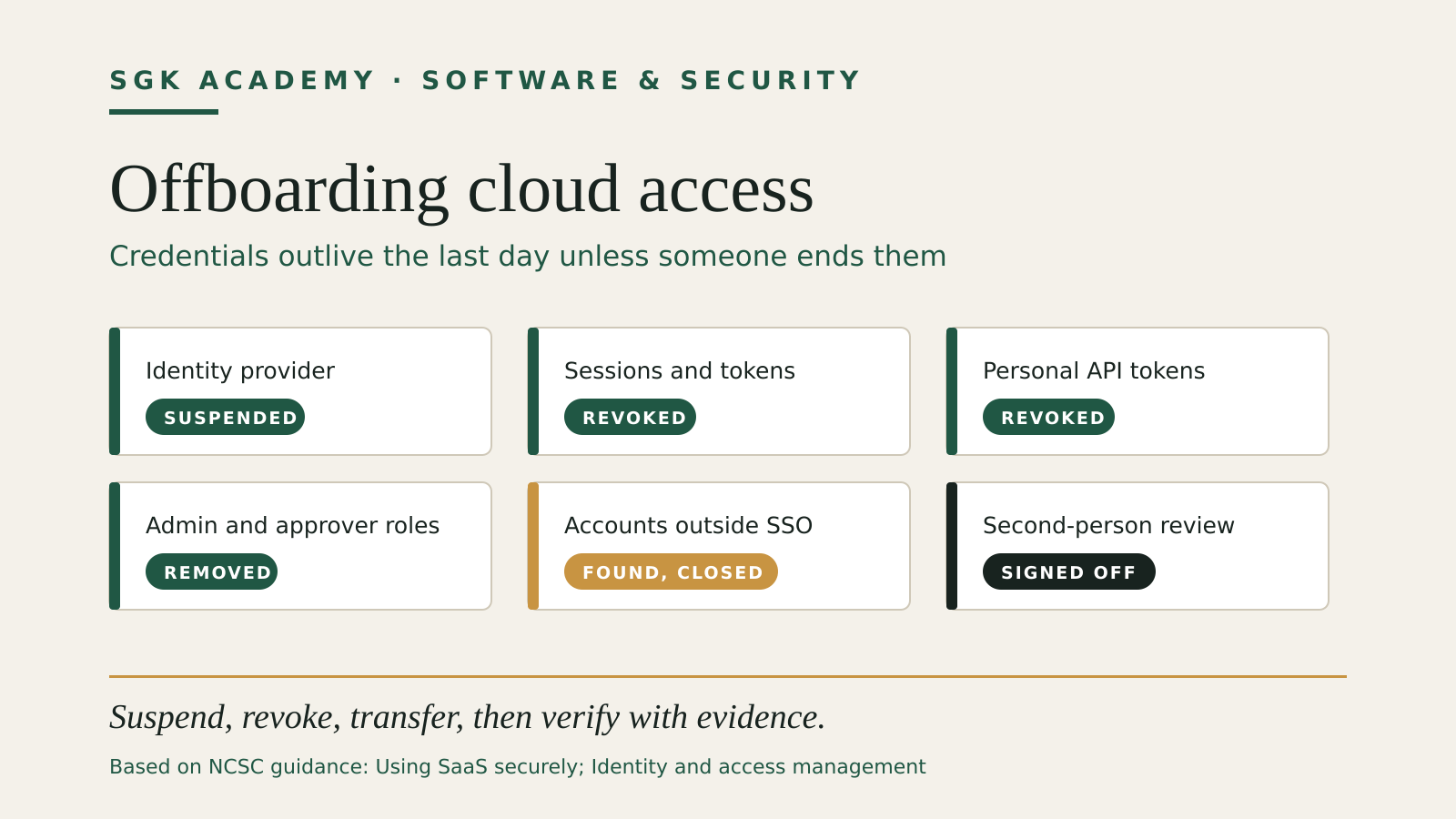
Cloud access offboarding is the moment a business proves whether its cloud access is actually under control. Removing an employee from payroll does not remove their SaaS accounts, API tokens, shared passwords or recovery methods.
This checklist covers the credential side: sessions, tokens, admin roles, service identities and the accounts that never went through single sign-on. It applies to employees, contractors and suppliers alike. The people side of a departure, such as handover of work, ownership decisions and the HR trigger, is in our employee offboarding access checklist; use the two together.
Keep one access inventory
Start with a list of the services that can hold business data or change business operations. Include more than email and file storage:
- identity provider and email;
- accounting, payroll and banking portals;
- payment processors and ecommerce tools;
- customer relationship management and support systems;
- source code, cloud infrastructure and domains;
- social accounts and advertising platforms;
- password managers;
- devices, VPNs and remote-access tools;
- integrations, bots, API keys and service accounts;
- recovery phone numbers, backup email addresses and hardware security keys.
For each service, record the business owner, current administrators, users, privileged roles, sign-in method, recovery method and last access review. Our software asset inventory guide sets out the fields and review routine for that register.
The NCSC guidance on using SaaS securely recommends a joiners, movers and leavers process for adding and removing users, run from a trusted source of identity. It favours automation where an organisational identity provider exists, so that access is disabled automatically when someone leaves a role, and periodic access reviews where it does not. Automation helps, but it does not replace an inventory: a direct account or API token can remain outside single sign-on.
Find the accounts that bypassed single sign-on
The hardest accounts to offboard are the ones nobody knew existed. A staff member signs up for a design tool, a file-transfer service or an AI assistant with their work email address, pays with a company card and never connects it to the identity provider. Suspending the central identity blocks their mailbox, but the third-party account may still accept a password the person remembers.
The NCSC’s identity and access management guidance says access policies should cover not only systems you control but anywhere organisational identities can be used, and gives the example of online services where staff can create an account with their work email address. It notes that single sign-on, where available, lets you revoke access to those services along with the work account.
Practical places to look before the last day:
- card and expense statements for software subscriptions;
- the mailbox for sign-up confirmations, invoices and password-reset messages;
- browser password managers on company devices;
- the identity provider’s list of connected or consented applications;
- the person’s own list, asked for in the exit conversation.
Each account found goes into the inventory with an owner. If the service supports single sign-on, connect it; if not, decide whether the business still needs it.
Give every account an owner
An account should belong to a named person or a documented service workload. Avoid generic user accounts such as marketing@ or admin@ when the platform supports individual identities.
For administrator access:
- keep day-to-day and administrator accounts separate;
- use the least privilege needed for the role;
- protect administrator accounts with strong multi-factor authentication;
- maintain at least two recovery-capable administrators controlled by different people;
- review administrator and finance-approval roles more frequently than ordinary access.
The NCSC’s admin-account guidance warns that an attacker with an admin account can often read all users’ emails, delete files and backups, or approve large invoices and transactions. It recommends 2-step verification on every admin account, more than one admin account each managed by a separate person, and prompt revocation when a member of staff leaves or changes role.
A second administrator is not a shared password. It is a separate accountable identity that can recover the service if the primary administrator is unavailable or compromised.
Keep one admin route that does not depend on single sign-on
If every administrator signs in through the identity provider, an outage or misconfiguration there can lock the business out of its own SaaS tenants, including in the middle of an offboarding. The NCSC SaaS guidance suggests keeping an administrative identity that authenticates directly to the application, so administrative access survives when the single sign-on provider is unavailable.
Treat that account as a sealed emergency route: strong unique credentials and multi-factor authentication, held by a named owner, tested on a schedule and reviewed whenever an administrator leaves. A departing administrator who knew how to reach it is the strongest case for rotating its credentials the same day.
The admin-account guidance adds a related point: keep the contact email addresses, phone numbers and company details on each provider account current. If you lose every admin account, those details are how you prove to the provider that you are the legitimate owner.
Trigger offboarding from a confirmed event
Define who starts the process and what evidence they need. A manager, HR lead or business owner should confirm:
- the person’s identity;
- their final working time;
- whether access should end immediately or at a planned time;
- any legal hold or preservation requirement;
- the systems, devices and clients they worked with;
- who will receive their ongoing work.
Do not rely on an informal chat message. Use a ticket or checklist with an owner, deadline and status.
For a planned departure, prepare transfers without weakening the account early. For an urgent termination, revoke access before or at the meeting, according to the business’s HR and legal process.
Disable first, then investigate
The safest default sequence is:
- suspend the central work identity;
- revoke active sessions and refresh tokens;
- disable VPN and device access;
- remove privileged roles and payment approvals;
- rotate shared secrets the person knew;
- revoke personal API tokens, SSH keys and app passwords;
- transfer owned resources;
- review forwarding rules, OAuth grants and recovery methods;
- preserve required records;
- delete the account only when retention and transfer checks are complete.
Suspension preserves an account for investigation and transfer while preventing new sign-ins. Immediate deletion can destroy logs, mailbox rules, ownership information or evidence that another system still depends on the identity.
The exact order changes when an account is the only owner of a critical resource. That is why resource transfer and a second administrator should be designed before a departure.
Revoke sessions, not only passwords
Changing a password may not invalidate existing browser sessions, mobile sessions, app passwords, API tokens or OAuth grants.
Check the service’s own documentation for:
- “sign out everywhere” or session revocation;
- active device lists;
- refresh-token invalidation;
- connected applications;
- personal access tokens;
- SSH and signing keys;
- generated app passwords;
- recovery codes and registered security keys.
Record what the platform actually invalidates. Do not assume a password reset covers every credential.
Rotate shared secrets deliberately
A departing person may know a Wi-Fi password, shared vault item, recovery phrase, vendor PIN or emergency code. Rotate secrets based on access, not suspicion.
Prioritize:
- domain registrar and DNS;
- cloud root or break-glass credentials;
- banking and payment approval secrets;
- shared password-manager items;
- production database and deployment secrets;
- social media recovery methods;
- office and building access codes.
Do not rotate a production secret without checking dependencies. Use the small-business cyber incident plan if the departure also involves suspected misuse or compromise.
Transfer resources without impersonating the leaver
Reassign files, shared drives, calendars, code repositories, dashboards and client records through administrator functions. Do not keep using the former employee’s identity.
For email, choose a documented approach:
- preserve the mailbox according to policy;
- set a narrowly written automatic reply if appropriate;
- delegate required business correspondence to a current employee;
- review and remove hidden forwarding rules;
- prevent new sign-ins;
- delete or archive only after the retention decision.
The same principle applies to social and advertising accounts: transfer ownership to business-controlled identities and remove the departing user.
Check finance and customer systems separately
High-impact systems deserve their own sign-off. Confirm that the person cannot:
- create or approve a payment;
- change payout bank details;
- issue refunds;
- change payroll;
- export customer data;
- change domain or DNS records;
- add a new administrator;
- generate new API credentials.
Where a platform supports dual approval, verify both the initiator and approver roles. Removing one role while leaving the other can still create a gap.
Do not forget service identities
Bots and integrations may have been created by the leaver. A human account can be disabled while its API token keeps running.
List each integration with:
- purpose;
- technical owner;
- business owner;
- permissions;
- credential type;
- last use;
- rotation date;
- dependency on the departed person’s account.
Move legitimate integrations to a documented service identity with minimum permissions. Revoke abandoned credentials. The NCSC SaaS guidance treats service identities, such as integrations and connections with other systems, as a separate category from user identities that needs its own management.
Contractors, agencies and managed service providers
Third parties are where offboarding most often stops halfway. The contract ends, the invoice is paid and nobody tells the identity provider. The NCSC SaaS guidance counts third parties such as managed service providers among a tenant’s administrative users, and the identity and access management guidance asks organisations to make sure they can revoke third-party access when necessary and to remove or suspend temporary accounts when they are no longer needed.
Give every external account an end date when it is created, and make the contract’s end date a trigger in the same ticket system you use for staff. Where an agency works through its own accounts in your tenant, ask for a list of the named people with access at the end of the engagement and compare it with what the tenant shows. Supplier logins on banking, payroll and payment portals deserve the same separate sign-off as staff finance roles.
Verify the result
A second person should check the closure, using evidence from the service rather than a completed checkbox alone.
Verification can include:
- the central identity shows suspended;
- active sessions are empty or invalidated;
- privileged roles no longer include the person;
- tokens and keys have been revoked;
- recovery email and phone entries are business-controlled;
- files and repositories have a current owner;
- payment approval lists are correct;
- audit logs show the expected changes;
- devices are returned, wiped or blocked according to policy.
Keep the ticket, timestamps, administrators who made the changes and any exceptions. If a service cannot revoke a session or transfer an asset, record the compensating control and escalation.
An illustrative leaver: one day, nine services
The scenario below is invented. A bookkeeper leaves a seven-person agency on a Friday after a planned notice period. The inventory lists nine services she used.
| Time | Action | Evidence kept |
|---|---|---|
| Monday before | Exit conversation; she lists two tools not in the inventory (a PDF signing service and a file-transfer account) | Updated inventory |
| Wednesday | Ownership of shared drives, client folders and two reports moved to the finance lead | Admin transfer log |
| Friday 17:00 | Central identity suspended; all sessions revoked in the identity provider | Identity provider audit entry |
| Friday 17:10 | Approver role removed in the bank portal; payroll and accounting roles removed | Screenshots of role lists |
| Friday 17:20 | Personal API token for the accounting integration revoked; integration moved to a service account | Token list before and after |
| Friday 17:30 | PDF signing and file-transfer accounts closed; company card subscription cancelled for one of them | Closure emails |
| Friday 17:40 | Shared vault items she could read rotated, starting with the bank portal recovery codes | Vault change history |
| Monday after | Second person checks every line against the service evidence | Signed-off ticket |
Two of the nine services would have been missed without the exit conversation. That is the usual pattern, and it is why the inventory work happens before the last day.
Test the checklist with a role change
You do not have to wait for a departure. Run the same process when someone changes role:
- remove permissions they no longer need;
- add only the new role’s permissions;
- verify old group membership is gone;
- review direct grants outside the normal groups;
- recheck high-impact systems.
The NCSC’s identity and access management guidance calls for a joiners, movers and leavers policy so access can be revoked or changed for movers, and for regular reviews of accounts and systems for unnecessary privileges.
A one-page offboarding record
Your record should contain:
| Field | Evidence |
|---|---|
| Person and role | Confirmed identity and final access time |
| Process owner | Person accountable for completion |
| Systems | Inventory entries checked, including accounts found outside single sign-on |
| Central identity | Suspension and session-revocation result |
| Privileged access | Roles removed and approvers verified |
| Credentials | Tokens, keys and shared secrets handled |
| Resources | New owner for data, code and accounts |
| Devices | Returned, blocked or wiped status |
| Exceptions | Missing capability and compensating control |
| Review | Second person, time and evidence links |
This is intentionally short. The value comes from linking each line to the platform’s evidence.