AI workflow costs should be measured per accepted business result, not per model call. A cheap response can become expensive after retries, document preparation and human correction. A more expensive call can be economical if it reliably reduces the work needed to finish the task. The comparison needs a defined outcome and a quality threshold.
This guide builds a small cost model for a document-processing workflow. All prices and results in the examples are hypothetical. The method is designed to remain useful when vendors change prices, models or billing units.
Define the unit you are buying
“Summarise a document” can mean producing any paragraph, producing a usable internal note or producing a checked summary that a colleague can act on. Those outcomes have different costs.
Choose a completed unit: for example, one accepted supplier-summary record containing the required facts and source locations. Specify what makes it accepted and what requires rejection or substantial revision.
Then count all work needed to reach that state. Include document collection, format conversion, model calls, retrieval, retries, review and corrections. A workflow that excludes preparation from its cost record can appear efficient simply by moving work to another person.
Use the same definition for the manual baseline. Comparing a checked human result with an unchecked model response is not a meaningful productivity calculation.
Start with the manual baseline
Measure a small sample of ordinary tasks before introducing automation. Record the time spent preparing, reading, checking and entering the result. Include difficult cases as well as easy ones.
Suppose an illustrative workflow processes 400 documents each month. A person takes six minutes per document, and the fully loaded internal time value used for planning is €30 per hour. That produces 40 hours and a modelled monthly labour cost of €1,200.
The €30 figure is a planning assumption, not a wage claim. Use a rate appropriate to the decision. If the saved time cannot be redeployed, describe the benefit as capacity or reduced delay rather than automatically claiming a cash saving.
Also record error rates and rework in the baseline. Automation does not need to be compared with an imaginary manual process that is perfect and free of supervision.
Build the automated cost from separate components
Model charges are one component. They may depend on input tokens, output tokens, cache treatment, tool calls or other units. Use the provider’s actual current billing documentation for the product you would buy.
Add fixed subscriptions, storage and integration costs where relevant. Separate monthly recurring costs from setup work so that the payback calculation remains visible.
Human review often dominates a small workflow. Measure how long a reviewer spends on accepted outputs and how often an output must be redone manually. A short average can conceal a difficult tail.
| Component | Quantity to measure | Why it matters |
|---|---|---|
| Preparation | Minutes per document | Work may move upstream |
| Model and tools | Billed usage per attempt | Retries increase usage |
| Review | Minutes per accepted result | Quality still needs checking |
| Rework | Share rejected and time to redo | Failures can erase savings |
| Fixed operation | Monthly subscriptions and support | Small volumes absorb more overhead |
| Setup | One-off implementation effort | Determines payback time |
Keep the units consistent. A monthly subscription, a per-token price and an hourly review rate cannot be compared until they are converted into the same cost basis.
Calculate a worked monthly example
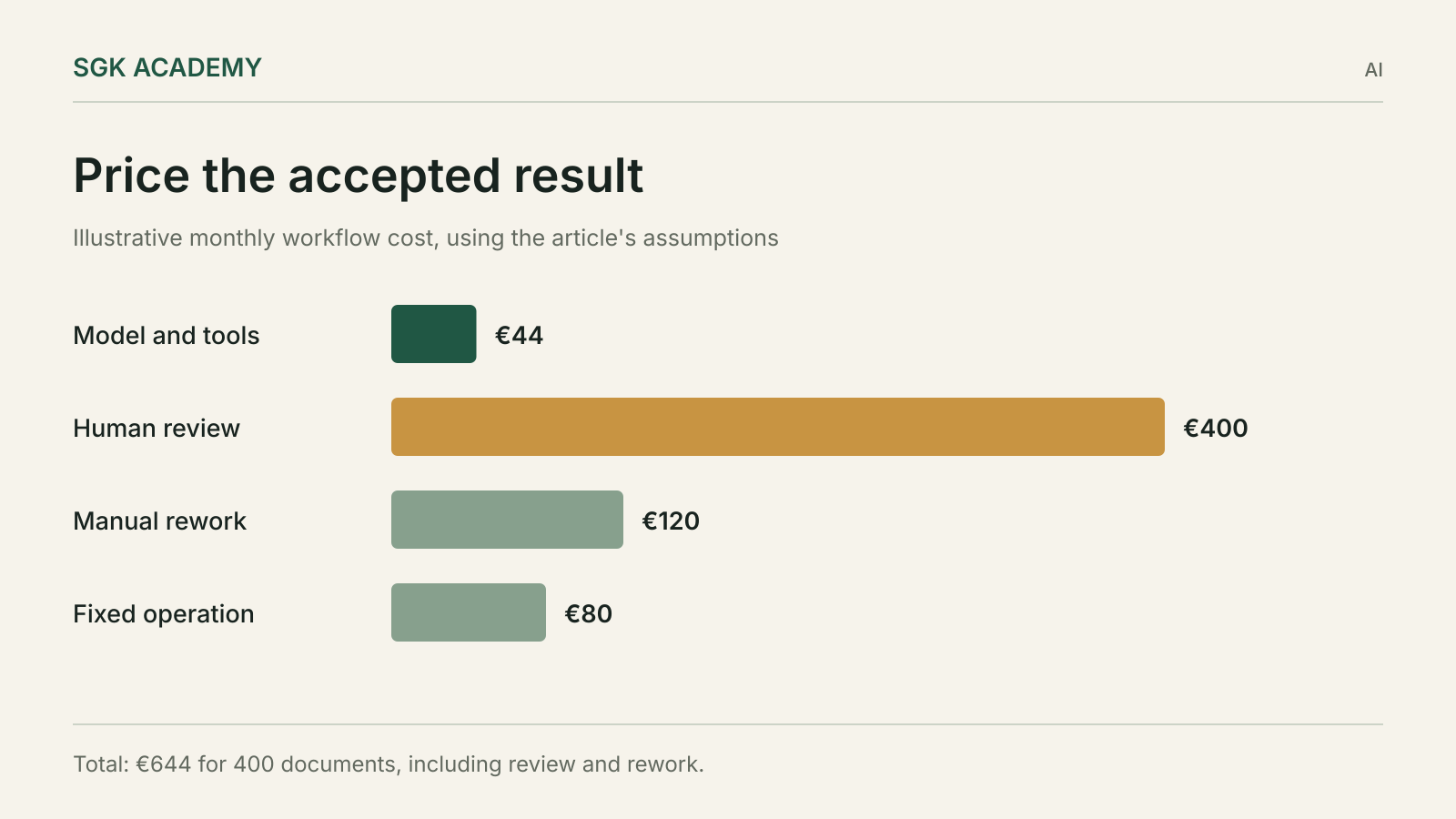
Continue with 400 documents. Assume the automated workflow costs €0.10 in model and tool usage per attempt, with 440 attempts because some tasks are retried. Usage therefore costs €44.
Assume every document receives two minutes of review, costing €400 at the illustrative €30 hourly rate. Forty documents require an additional six minutes of manual rework, costing €120. Add €80 for fixed monthly operation.
The modelled automated total is €644: €44 plus €400 plus €120 plus €80. Compared with the €1,200 manual baseline, the difference is €556 per month under these assumptions.
That is not a measured saving from a real deployment. It is a worksheet demonstrating what must be counted. If implementation costs €2,000, the simple payback period is about 3.6 months, ignoring financing, changes in volume and benefits or costs outside the model.
Test the assumption most likely to change the result
Review time is often more influential than the model price. In the example, increasing review from two minutes to four minutes adds €400 per month. Doubling model usage cost adds only €44.
That does not mean model pricing is always unimportant. At high volume or with long inputs and complex tool use, it can be substantial. The point is to identify the actual cost driver rather than optimise the most visible price.
Run a sensitivity table. Change review time, rejection rate, document volume and usage cost separately. Then test a plausible combination of adverse changes.
| Scenario | Change from the worked example | Monthly total |
|---|---|---|
| Base assumptions | Two-minute review | €644 |
| Slower review | Four minutes per document | €1,044 |
| Usage price doubles | Same review and rework | €688 |
| Both changes | Four-minute review and doubled usage | €1,088 |
A workflow with a small margin of benefit deserves a different decision from one that remains useful under conservative assumptions.
Count retries without hiding failed work
A retry can be useful, but it is still another attempt. Record why it happened: missing data, tool failure, invalid format, incorrect answer or a deliberate quality improvement.
Do not report cost per successful call while excluding failed calls. The business pays for the route to the accepted result, including attempts that produced nothing usable.
Also distinguish automated retries from human repair. A person who rewrites a prompt, finds a missing document and reruns the task has contributed labour even if the model’s second answer is correct.
Set a stopping rule. If a task fails repeatedly, route it for manual handling rather than allowing an unbounded loop. The rule should reflect the cost and consequence of the task, not just a desire to maximise the apparent automation rate.
Reduce context with a quality test attached
Sending every document and the full conversation on every attempt can increase cost and distract the model. Anthropic’s September 2025 article on context engineering treats context as a finite resource that needs selection and management.
Possible improvements include retrieving the relevant section, removing duplicated material and keeping stable instructions separate from changing task data. These are design options, not guaranteed savings.
Every reduction should be checked against the evaluation set. Removing a paragraph may reduce tokens while eliminating the exception needed to answer a difficult case. A cheaper wrong answer is not an improvement.
Caching can also affect cost where the provider supports it, but billing rules and cache behaviour are product-specific. Use measured billed usage rather than assuming that repeated text automatically receives a discount.
Price quality failures by consequence
A rejected internal summary and an incorrect payment instruction have different consequences. Some failures create extra minutes of review; others can create financial or customer harm.
Keep consequential actions outside a simplistic average-cost calculation. A workflow should satisfy the necessary authority and accuracy conditions before its unit cost is used to justify deployment.
For ordinary quality issues, record the type and repair effort. This can reveal that a seemingly small error, such as using the wrong company identifier, forces a reviewer to recheck the entire output.
Our AI agent testing guide explains how to evaluate outcomes and permissions separately. Use those results to establish the accepted unit in the cost model.
Account for maintenance after launch
Documents change, templates drift, providers revise products and business policies evolve. A workflow that works once can require ongoing attention.
Include a reasonable support allowance based on the actual system. Track time spent investigating failures, updating rules and reviewing changes. Avoid pretending that integration work ends permanently on launch day.
Version the workflow and its evaluation set so that a cost change can be explained. Higher usage may come from larger documents, more retries, a different model or a new task requirement.
When the business expands the task, update the baseline too. A system that now extracts twice as many fields should not be compared uncritically with the cost of the narrower original job.
Decide with a small operating report
A useful monthly report contains volume, accepted results, rejection rate, review time, billed usage, total cost and the main failure categories. Add latency if turnaround time matters.
Show both total cost and cost per accepted result. At low volume, fixed costs can make a useful workflow look expensive per item; at high volume, a small review burden can dominate the total.
Compare the report with the decision assumptions. If the saving depended on two-minute review and actual review takes five minutes, address that gap before expanding the workflow.
The decision may still favour the tool because it improves consistency, availability or turnaround. State that benefit directly rather than presenting a financial saving the evidence does not support.
Keep an easy-case pilot from distorting the estimate
A pilot often begins with clean, short documents because they are convenient to collect. If the production workload includes scans, long appendices or conflicting records, the pilot’s average may understate both usage and review.
Split the sample into a few meaningful groups and show the cost for each. Then weight those groups by their expected share of the real workload. A workflow can be attractive for clean digital documents while remaining unsuitable for poorly scanned records.
That finding can support a narrower launch: automate the cases that meet the acceptance standard and route the others explicitly. It is better to price two honest paths than hide the difficult work inside an optimistic average.
Questions
Should I compare AI tools by token price?
Token price is only one input. Compare the total cost of producing an accepted result, including preparation, retries, review and maintenance.
How should I value time saved?
Use a rate appropriate to the business decision and distinguish redeployable capacity from an actual reduction in cash expenditure.
Can prompt caching make a workflow cheaper?
It can where the provider supports it and the workload qualifies. Verify the billing rules and measured usage, then test that quality remains acceptable.
What is the most useful first measurement?
Measure the manual task and define acceptance. Without those, a faster response cannot be translated into a reliable cost comparison.