A VIES VAT number check tells you one thing: whether the tax administration that issued an EU VAT number records it, on the day you ask, as valid for cross-border trade. That answer carries real weight. Under EU rules it is the standard way to treat a customer as a business, drop the VAT and invoice under the reverse charge.
It is also narrower than many founders assume. A “valid” answer does not prove that the person emailing you runs that business, it does not cover the rest of the transaction, and on its own it is not proof you can show an auditor two years later.
This guide covers how the European Commission’s VIES service works, how to run a check that leaves evidence behind, how to read each answer and what to do when a real customer comes back as invalid. It is built on the Commission’s VIES pages, EU VAT law and HMRC guidance, checked on 4 October 2026.
What VIES is, and what it is not
VIES stands for VAT Information Exchange System. The Commission’s Your Europe page on checking a VAT number describes it as “a search engine (not a database) owned by the European Commission. The data is retrieved from national VAT databases when a search is made from the VIES tool.” The VIES help page puts it more bluntly: “There is no VAT database at Community level.” Your request goes to the tax administration of the country you select, and its answer comes back in a few seconds.
Two consequences follow. First, the answer is only as good as the national register behind it. The VIES disclaimer says the information “is obtained from Member States’ / Northern Ireland databases over which the Commission services have no control”, and Your Europe adds that the Commission “cannot check, correct, add or delete any national VAT registrations.” Second, the answer is current, not historical. The VIES FAQ says “the data is real-time”: each request asks the issuing country whether the number is valid now. VIES does not show when a number became valid or stopped being valid.
The legal basis is Article 31(1) of Council Regulation (EU) No 904/2010, as replaced by Regulation (EU) 2017/2454: member states must let “persons involved in the intra-Community supply of goods or of services” obtain “confirmation by electronic means of the validity of the VAT identification number of any specified person as well as the associated name and address.”
Why the check matters for your invoice
For services, the check is written into the rules that decide whether your customer is a business. Article 18(1)(a) of Implementing Regulation (EU) No 282/2011 says that, unless the supplier has information to the contrary, it may regard a customer established in the EU as a taxable person “where the customer has communicated his individual VAT identification number to him, and the supplier obtains confirmation of the validity of that identification number and of the associated name and address in accordance with Article 31” of Regulation 904/2010. That is the VIES check.
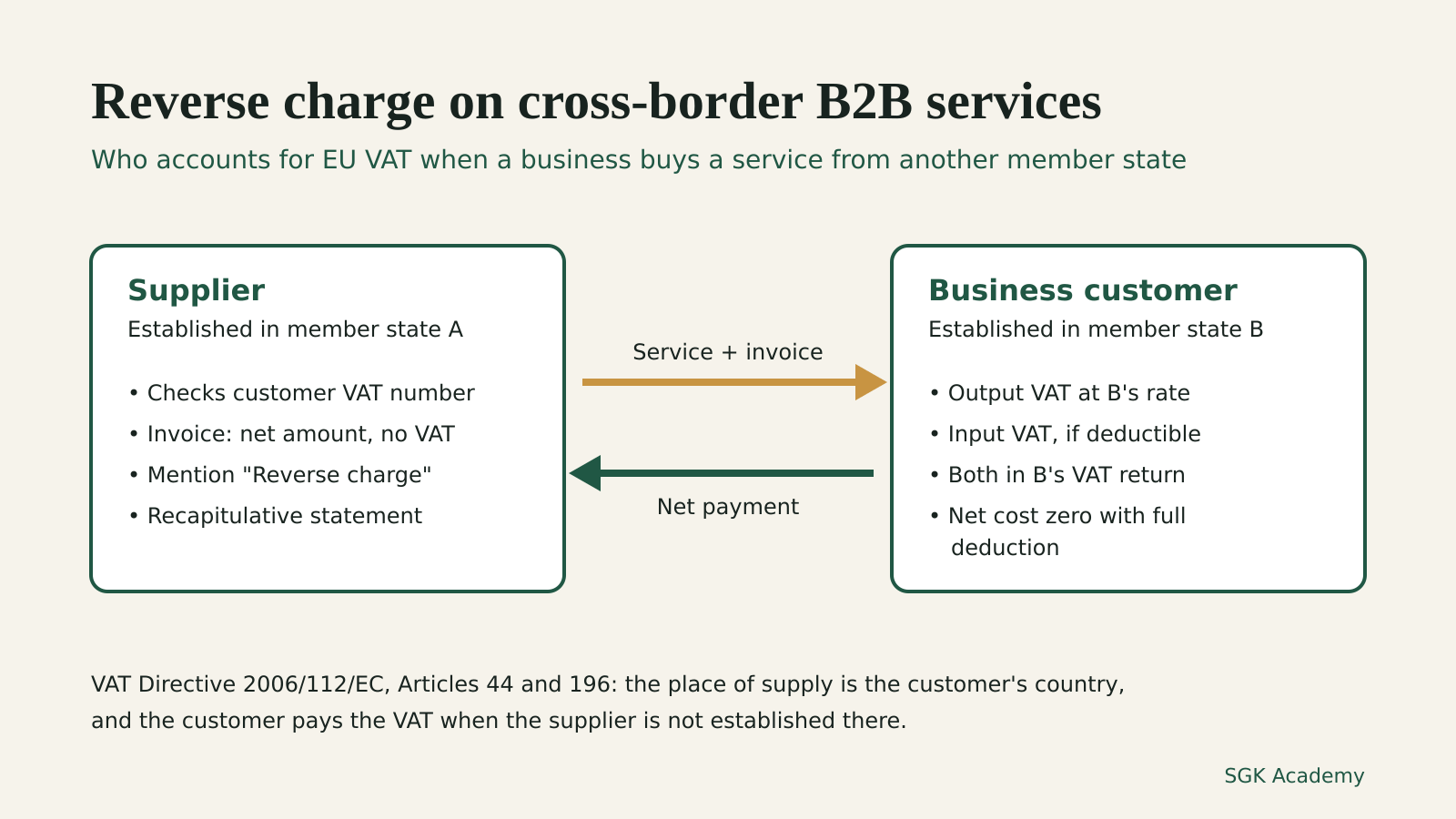
If the customer is a taxable person and the service falls under the general business-to-business rule, the place of supply is the customer’s country and the customer pays the VAT. Our guide to reverse charge VAT on services in the EU covers that rule, the invoice wording and the recapitulative statement.
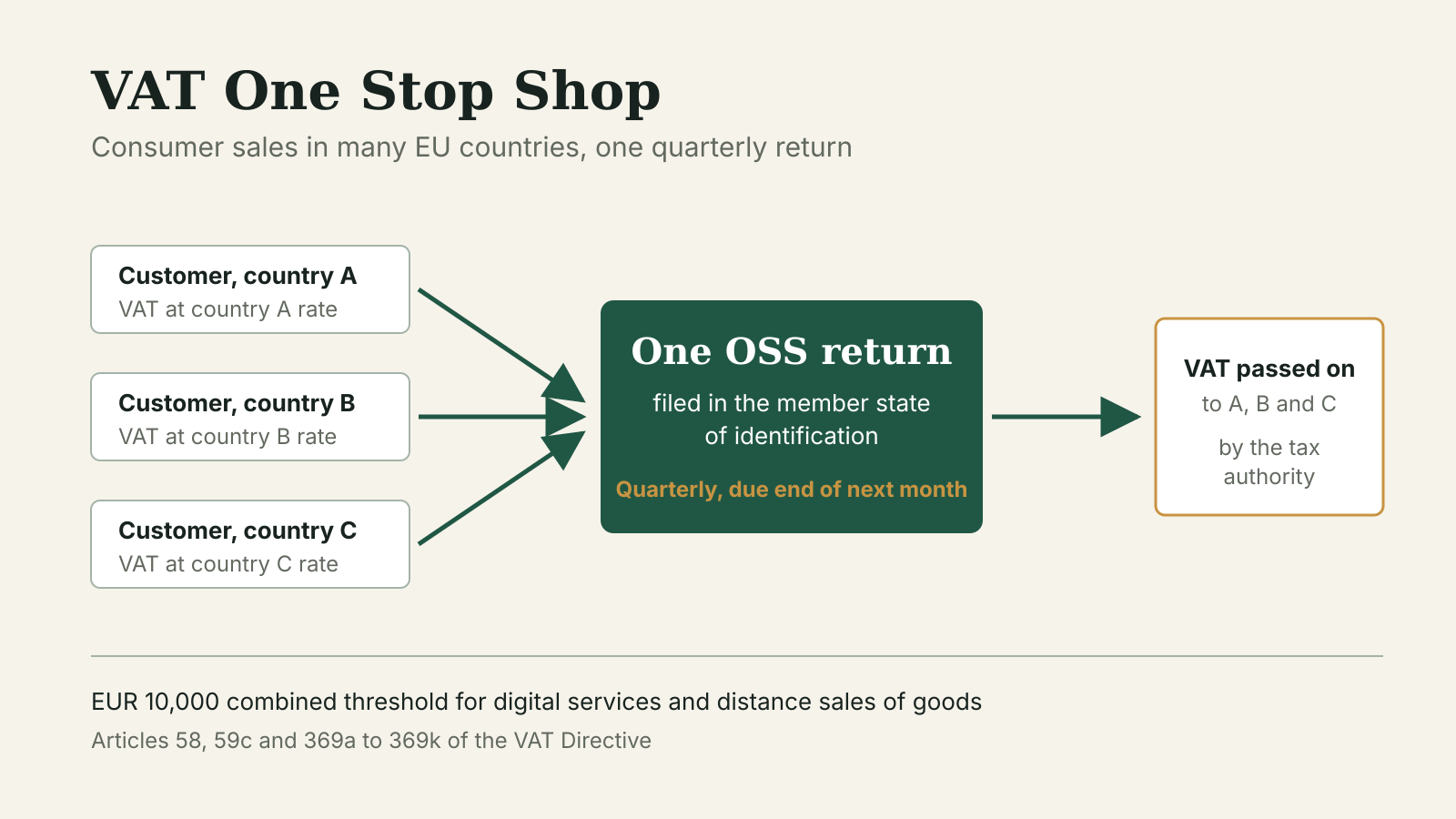
The regulation also covers the opposite case. Under Article 18(2), a supplier may treat an EU customer as a non-taxable person “when he can demonstrate that the customer has not communicated his individual VAT identification number to him.” For telecommunications, broadcasting and electronically supplied services, the supplier may do so “irrespective of information to the contrary” as long as no VAT number has been given. Those consumer sales then usually carry the customer’s VAT, which is the territory of the VAT One Stop Shop.
There is a middle route for a new business. Article 18(1)(b) covers a customer who “has not yet received an individual VAT identification number, but informs the supplier that he has applied for it”. The supplier may treat that customer as a taxable person if it “obtains any other proof which demonstrates that the customer is a taxable person” and carries out “a reasonable level of verification of the accuracy of the information provided by the customer, by normal commercial security measures such as those relating to identity or payment checks.” That is more work than a VIES check, and the evidence burden sits with the supplier.
For goods the rule is stricter. Since 1 January 2020, Council Directive (EU) 2018/1910 has made the customer’s VAT number part of the exemption itself. Article 138(1)(b) of the VAT Directive now requires that the buyer “is identified for VAT purposes in a Member State other than that in which the dispatch or transport of the goods begins and has indicated this VAT identification number to the supplier.” Recital 7 of the 2018 directive explains that inclusion of the buyer’s number in VIES should become “a substantive condition for the application of exemption rather than a formal requirement.” New Article 138(1a) adds that the exemption does not apply if the supplier fails to file a correct recapitulative statement for the sale, “unless the supplier can duly justify his shortcoming to the satisfaction of the competent authorities.”
How to run a check you can prove later
The free service is VIES on the web. The form has two parts, and the second one is the one people skip.
- Select the country that issued the number. The prefix is part of the number. Article 215 of the VAT Directive (see the legislation.gov.uk copy) says each VAT number has an ISO 3166 two-letter prefix identifying the issuing country, and that “Greece may use the prefix ‘EL’”. VIES lists Greece as EL, not GR. Northern Ireland has its own entry, XI.
- Type the number as one string. The help page says letters “should be typed in upper case letters” and the number “should be typed as a continuous string without spaces or dots.” Austrian numbers need care: the FAQ explains that the prefix is “AT” and that “the first position for Austrian VAT numbers is always ‘U’”, so the U goes into the number field.
- Enter your own VAT number as the requester. This is optional on the form but it changes what you get back. The help page says: “If you put your own VAT identification number in the box requester’s VAT identification number, the reply will contain a unique consultation number. If you want to be able to prove to a tax administration of a Member State that you have checked a given VAT number at a given time, and obtained a given validation reply, please keep this consultation number in your archives.”
- Save the result. Keep the consultation number, the date and time, the number as checked, the name and address shown (if any) and the answer. Store it with the customer record and refer to it from the invoices that rely on it. Your Europe recommends that you “keep track of your validation in case of tax control.”
If you check numbers from accounting software instead of the website, the FAQ says a SOAP web service offers “the same functionality as the interactive service”, and that the disclaimer, help and FAQ apply to it too. Make sure your integration sends your own number as requester, or it will not receive a consultation number either.
Reading the answer
The help page lists the replies VIES can give. Here is what each one means for your invoice.
| VIES reply | What the Commission says it means | What to do |
|---|---|---|
| Yes, valid VAT number | The issuing country confirms the number is valid for cross-border transactions | Compare the name and address with your customer’s details and save the consultation number |
Valid, with name and/or address shown as --- | “The Member State that issued the VAT number does not allow to disclose this information” | Validity is confirmed; ask your own tax administration to confirm that the number is associated with your customer’s name and address (see below) |
| No, invalid VAT number | “The number introduced is not valid at least on the date specified” | Do not apply the reverse charge on this basis; follow the steps in the next section |
| Service unavailable | A problem “with either the network or the Web application” | Retry later; no conclusion either way |
| Member State service unavailable | The issuing country’s application “is not available” | Retry later; the help page lists regular maintenance windows by country |
| Error: incomplete or corrupted input | The country or number was not entered correctly | Check the prefix, spaces and characters, then retry |
A missing name is a national choice, not a warning sign. The FAQ says: “Certain Member States permit the display of the name and address of the taxable person where the VAT number is currently valid. If no name/address is displayed, this means that the relevant Member State does not permit the display of this data. Customers have the right to get confirmation from their own tax administration if a VAT identification number is associated with a name and/or address.” Your Europe explains the limit: for data protection reasons, national authorities “will not supply the name and address corresponding to a VAT number. They will only confirm if there is a certain name and address associated with a specific VAT number or not.” How you ask differs by country; some have online systems, others work by phone, post or form.
What a valid result proves, and what it does not
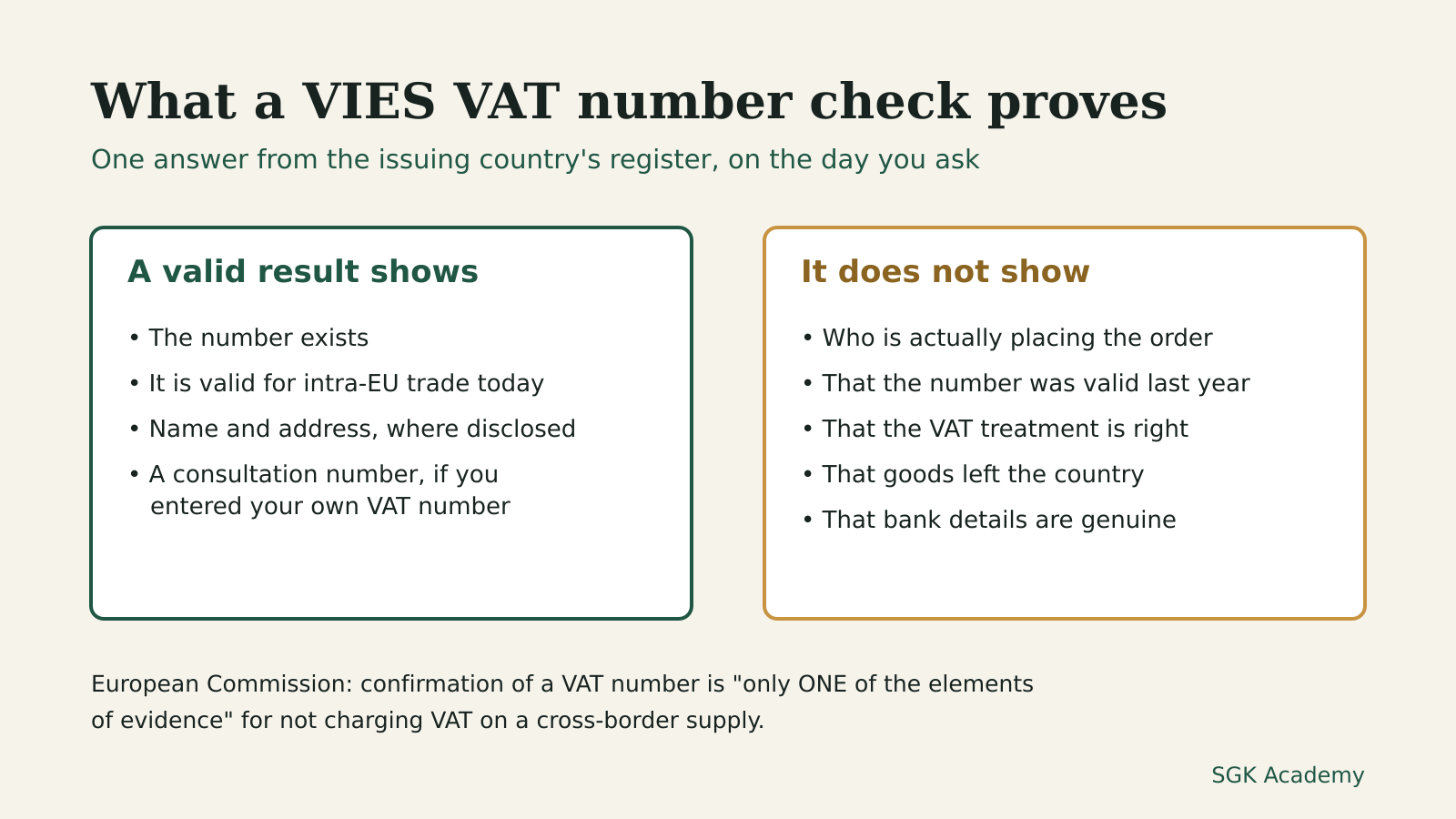
A valid answer with a matching name and address confirms three things: the number exists, the issuing country records it as valid for cross-border trade on the day of your check, and (where shown) it belongs to that name and address. With the consultation number, you can also show when you checked and what you were told.
It does not prove the rest of the picture.
- It does not prove who you are dealing with. VIES checks a number, not a person. If someone quotes a large company’s number from a personal email address and asks you to deliver somewhere unrelated, the number can be valid and the order still not come from that company. Article 18(1) applies “unless he has information to the contrary”, so facts you already know count against a clean VIES result.
- It does not settle the VAT treatment on its own. The help page says confirmation of the number “is only ONE of the elements of evidence supporting the VAT exemption of intra-community supplies of goods (article 138, paragraph 1 of Council Directive 2006/112/EC) or the non-application of VAT on a supply of services due to its localisation in another Member State.” The disclaimer adds that the information “does not in itself give a right to exempt intra-Community supplies from Value Added Tax” and “does not change any obligations imposed on taxable persons in relation to intra-Community supplies.” For goods you still need evidence that they left your country; for services, the service must follow the general rule.
- It does not prove the number was valid on another date. The data is real-time and VIES keeps no public history, so a check run today says nothing reliable about last March. Your own saved record is the only history you will have.
- It does not check bank details or payment instructions. A valid VAT number on an invoice from a supplier says nothing about whether the account number on it is genuine. Our guides to invoice fraud checks and Verification of Payee cover that separate control.
The FAQ also states the fallback plainly: “If you believe that your customer is not a taxable person, you should not exempt the supply but should charge VAT.”
When a real business comes back as invalid
An invalid answer does not always mean the number is fake. Your Europe gives three reasons a number may not be in the national register used by VIES: “the VAT number does not exist”, “the VAT number has not been activated for intra-EU transactions”, or “the registration is not yet finalised (some EU countries require a separate registration for intra-EU transactions).” It adds that changes “are not always reflected immediately in the national databases and consequently in VIES.”
The FAQ sets out the order of steps. First, “check with your customer that the number quoted is correct (correct number of characters, correct length and country prefix).” If it still shows as invalid, “you should ask that business to contact his/her tax administration to request that the data in the national VAT Information Exchange System (VIES) be updated (only national tax administrations can update VIES data).” It also warns that some member states record in VIES only numbers registered for intra-EU transactions, so “a VAT number, even if correct, will not be validated through VIES, because the owner of that VAT number is not involved in intra-EU transactions or did not register for that purposes”.
While the customer sorts this out, you can wait to invoice until the number validates, or invoice with VAT and correct the invoice later if your national rules allow it.
The same advice applies when your own number fails. The FAQ says: “If your VAT number appears as invalid, you should take this matter up with your own tax administration.” A small business that registered only for domestic VAT, or that sits under a national exemption, should check this before sending its first cross-border invoice. The EU SME VAT scheme guide explains why an exempt business may still need a number for cross-border services, and the VAT thresholds and rates by country catalog lists each country’s domestic registration limit.
Worked example (illustrative)
A translator established in Belgium agrees a EUR 3,000 job with a marketing agency established in another member state. The agency sends its VAT number in an email from its company domain, along with its registered address.
The translator selects the agency’s country in VIES, types the number without spaces, enters her own Belgian VAT number as requester and runs the check. VIES returns “Yes, valid VAT number”, the name and address appear as ---, and the reply includes a consultation number.
Validity is confirmed, but the name is not. She saves the result and uses her own tax administration’s procedure to confirm that the number is associated with the agency’s name and address. With that confirmation and no information to the contrary, she treats the agency as a taxable person under Article 18(1)(a) and invoices EUR 3,000 with no VAT, the agency’s VAT number and the mention “Reverse charge”, filing both records with the invoice.
Change one fact: VIES returns “No, invalid VAT number”, and the agency explains it holds a domestic number only. Until it registers for intra-EU transactions and the number validates, the translator has no confirmation to rely on, and the FAQ’s instruction applies: if she believes the customer is not a taxable person, she should charge VAT.
The UK and Northern Ireland
Since 1 January 2021, VIES does not check British GB numbers. The notice on the VIES page says that “the VoW service to validate UK (GB) VAT numbers ceased to exist” and that “all traders seeking to validate UK (GB) VAT numbers may address their request to the UK Tax Administration.” At the same time it added validation for numbers “starting with the ‘XI’ prefix”, used by businesses operating under the Protocol on Ireland and Northern Ireland. VIES lists these under “XI-Northern Ireland”.
For GB numbers, HMRC runs its own Check a UK VAT number service. It checks “if a UK VAT registration number is valid” and “the name and address of the business the number is registered to”. HMRC adds that “if you are a UK VAT-registered business, you can also use this service to prove when you checked a UK VAT number. You will need your own VAT number to do this.” The service cannot search by business name.
UK suppliers billing EU businesses use VIES too: HMRC’s VAT Notice 741A says in paragraph 6.3 that for EU customers the VAT registration number “is the best evidence” of business status.
A record-keeping routine for a new client
- Ask for the client’s VAT number, full legal name and registered address in writing before the first invoice.
- Run the check in VIES (or HMRC’s service for a GB number) with your own VAT number as requester.
- Save the consultation number, date and time, number checked and the full reply.
- Compare any name and address shown with the client’s details; if they differ, ask before invoicing.
- If the name or address shows as
---, ask your own tax administration to confirm the association. - If the result is invalid, ask the client to correct the number or contact its tax administration, and decide whether to wait or invoice with VAT.
- Put the client’s VAT number on the invoice, as Article 226 of the VAT Directive requires when the customer pays the VAT.
- Check again before invoicing a client you have not billed for a while, and keep each new record, since VIES shows only the current status.
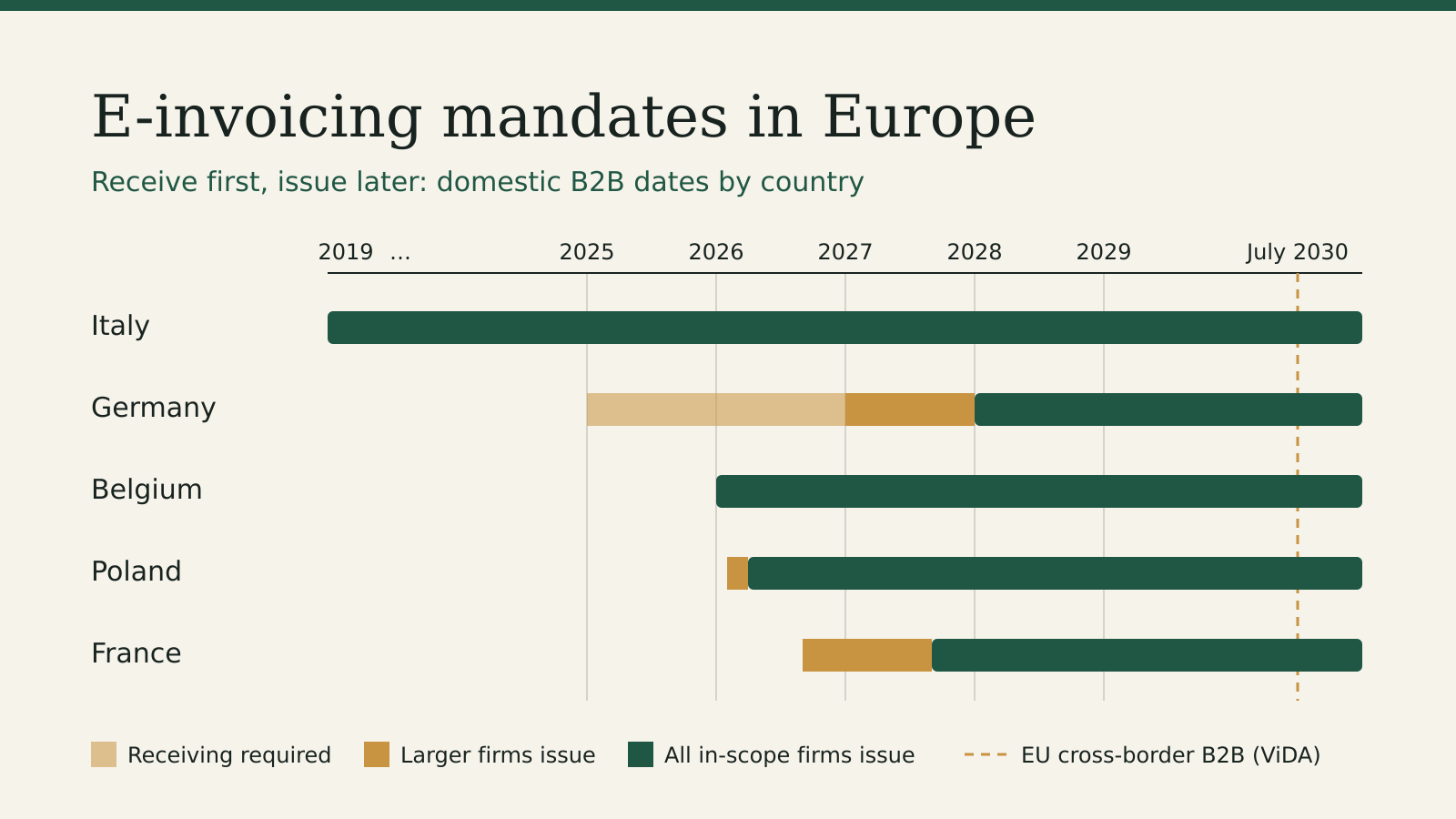
Point 8 is a working habit rather than a legal requirement: no EU text sets a re-check interval, but a record from around the date of the supply is the evidence a tax office will ask about. For the structured invoice formats arriving country by country, see our guide to e-invoicing mandates in Europe.
Common mistakes
- Running the check without your own number. You get an answer but no consultation number to show later.
- Wrong prefix or format. Greece is EL, Northern Ireland is XI, and Austrian numbers keep the U after AT.
- Reading
---or “Member State service unavailable” as invalid. The first is a disclosure choice; the second means the national system did not answer. - Relying on VIES alone for goods. Proof of transport and a correct recapitulative statement are separate conditions under Article 138.
Questions
What does a VIES VAT number check prove?
That the issuing country records the number as valid for cross-border trade at the time of the check and, where it allows disclosure, the name and address it belongs to. The Commission calls this “only ONE of the elements of evidence” for not charging VAT.
How do I get a VIES consultation number?
Enter your own VAT number in the requester field. The reply will then “contain a unique consultation number”, which you keep to prove when you checked and what you were told.
My customer’s number is invalid in VIES but they say they are registered. What now?
Ask them to check the number and prefix, then to contact their tax administration, since some countries require a separate registration for intra-EU transactions. Until it validates, the FAQ says that if you believe the customer is not a taxable person, you should charge VAT.
Can I check a UK VAT number in VIES?
Only XI numbers for Northern Ireland. For GB numbers, use HMRC’s Check a UK VAT number service.