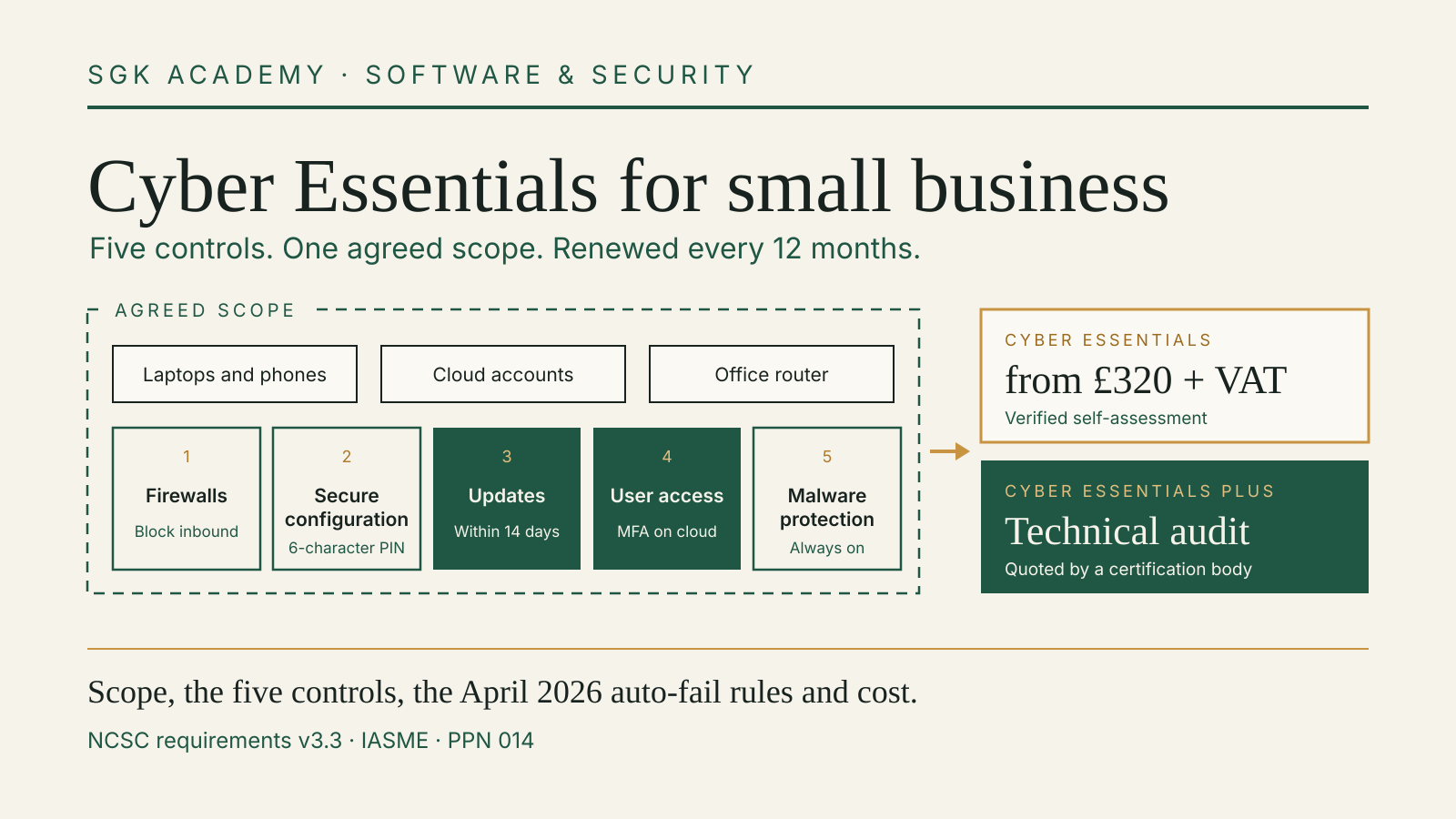
Cyber Essentials for small business is the UK government’s baseline security certificate: five technical controls, an online self-assessment marked by an independent assessor, and a certificate that lasts 12 months. It costs from £320 plus VAT for an organisation with up to nine employees, and many central government contracts that involve personal data require it. Since April 2026 the rules are stricter in two places: multi-factor authentication on cloud services and 14-day security updates are now automatic-fail questions.
This guide covers what has to be in scope, what each control asks of a small team, what changed with version 3.3 of the requirements, and how to budget for certification and renewal.
What the certificate is, and who runs it
The National Cyber Security Centre (NCSC) describes Cyber Essentials as “the minimum standard of cyber security recommended by the Government for organisations of all sizes” on its scheme overview. The NCSC writes the standard. IASME, its official delivery partner, sells the assessments, licenses the certification bodies and publishes the list of certified organisations.
There are two levels:
| Cyber Essentials | Cyber Essentials Plus | |
|---|---|---|
| Controls | The same five | The same five |
| How it is checked | Online questionnaire, signed off by a senior person, marked by an assessor | The same questionnaire, then a technical audit of your systems |
| Price | Fixed by organisation size, from £320 plus VAT | Quoted by a certification body |
| Validity | 12 months | 12 months |
According to IASME’s FAQ, the Plus audit includes internal and external vulnerability scans and then tests a random sample of user devices, typically about 10 per cent, plus all internet gateways and all servers reachable by unauthenticated internet users. If you gained the basic certificate less than 3 months before the Plus audit, you do not repeat the questionnaire.
Step one: draw the scope
Every later answer depends on the boundary, so settle it first. The NCSC’s Requirements for IT Infrastructure v3.3 (April 2026) says certification should cover the whole IT infrastructure used for the business, or a well-defined, separately managed subset. You must name the business unit, the network boundary and the physical location, and agree the scope with the certification body before assessment.
Several points in the document catch small teams:
- End-user devices must be included. “A scope that doesn’t include end-user devices isn’t acceptable.”
- Cloud services cannot be left out. Version 3.3 adds a definition (an on-demand service on shared infrastructure, reached through an account, that stores or processes your data) and states plainly that such services cannot be excluded.
- Personal phones and laptops count. User-owned devices that reach organisational data or services are in scope. The exception is a device used only for native calls, native texts or an MFA app.
- Home routers are usually out. A router the business supplies is in scope; other home routers are not, so the laptop behind them needs its own software firewall.
- Accounts used by suppliers count. Accounts your organisation owns are in scope even when an IT provider or contractor uses them, and you must be able to show the controls are met.
A partial scope is allowed, but you have to justify it to the assessor, and the free insurance described below only applies when the whole organisation is certified.
The five controls in practice
1. Firewalls
Every in-scope device must sit behind a correctly configured firewall, or run one. For each firewall, the requirements list five duties: change the default admin password or turn off remote administration; keep the admin interface off the internet unless there is a documented need and it is protected by MFA or an IP allow list; block unauthenticated inbound connections by default; have inbound rules approved and documented with the business reason; and remove rules that are no longer needed. The NCSC advises using the firewall built into the laptop’s operating system.
2. Secure configuration
Remove unused accounts and software, change default passwords, and turn off auto-run features that execute files without the user’s approval. Devices that need someone physically present to unlock them need a PIN, password or biometric, protected against guessing by either throttling (no more than 10 guesses in 5 minutes) or a lock after 10 failed attempts. A credential used only to unlock a device must be at least 6 characters long.
3. Security update management
All software in scope must be licensed and supported, which the document defines as software whose vendor has committed to regular vulnerability fixes and has published the date those fixes stop. Unsupported software must be removed or moved into a segregated subset with no internet traffic. Automatic updates should be on where possible. Updates that fix vulnerabilities the vendor rates “critical” or “high risk”, or that score 7 or above on CVSS v3, or where the vendor gives no severity at all, must be installed within 14 days of release.
4. User access control
You need a process to create and approve accounts, unique credentials for every user, and removal of accounts and privileges when people leave or change roles. Administrative work must be done from separate accounts that are not used for email or web browsing. MFA must be used where available, and “authentication to cloud services must always use MFA”. For password-based logins, the standard accepts one of three quality controls: MFA, a minimum of 12 characters, or a minimum of 8 characters with automatic blocking of common passwords. It also tells you not to enforce regular password expiry or complexity rules. Version 3.3 counts FIDO2 authenticators, including passkeys, as MFA; our guide to passkeys and account recovery covers planning for a lost device.
5. Malware protection
Each device needs either anti-malware software that is kept updated, blocks malware and malicious code and stops connections to malicious websites, or application allow-listing, where only approved, code-signed applications can run. The anti-malware option applies to Windows and macOS devices; allow-listing can be used on any device.
What changed in April 2026
IASME and the NCSC review the requirements every year. The 2026 changes took effect for assessment accounts created after 26 April 2026; an account opened before then had 6 months to finish under the previous rules, version 3.2. IASME’s February 2026 notice and the v3.3 document list the changes:
| Change | What it means for a small team |
|---|---|
| MFA on cloud services is now an automatic fail | If a cloud service offers MFA, free or paid, and it is not turned on, the assessment fails outright |
| Two update questions became automatic fails | Question A6.4 (operating systems, router and firewall firmware) and A6.5 (applications, including extensions) ask whether all high-risk or critical fixes are installed within 14 days |
| Cloud services defined and never excludable | Business accounts on services such as Microsoft 365, Dropbox and Gmail, the document’s own examples, are in scope |
| Scope wording simplified | Any internet-connected device that can accept inbound or make outbound connections is in scope |
| Passkeys named | The passwordless definition now includes FIDO2 authenticators |
| Backups moved up the document | Still not a requirement, but recommended, with external drives disconnected between backups |
| Software development | Bespoke web application code is out of scope; the document points to the government’s Software Security Code of Practice |
What it costs
IASME prices the basic certificate by headcount, using the government’s size bands. Figures from the IASME FAQ, checked 15 October 2026:
| Employees | Price |
|---|---|
| 0 to 9 | £320 plus VAT |
| 10 to 49 | £440 plus VAT |
| 50 to 249 | £500 plus VAT |
| 250 or more | £600 plus VAT |
Cyber Essentials Plus is quoted individually by a certification body, depending on the size and complexity of your network. Paying a certification body or an NCSC-assured Cyber Advisor for hands-on help is a separate, optional cost.
The fee is annual because the certificate expires after 12 months, and you answer the full question set again at each renewal. A practical budgeting point: a micro business that grows from 9 to 10 employees moves into the next band, so the renewal fee rises from £320 to £440 plus VAT at current prices.
Time also matters. Once you pay, you have 6 months to submit. IASME says an assessor aims to mark a submission within 3 working days. If you fail, you have 2 working days to fix simple issues and resubmit at no charge; after that, you apply and pay again. A board member or equivalent signs a declaration that the answers are true.
The included insurance
A UK-domiciled organisation, including one in the Crown Dependencies, with turnover under £20 million that certifies its whole organisation can opt in to cyber liability insurance arranged by IASME. IASME’s insurance page gives the terms: AIG is the insurer, the total limit is £25,000, there is a £1,000 excess (£5,000 for claims arising from activities in the USA or Canada), and money stolen electronically or by cyber fraud is not covered. Treat it as incident-response support for a small breach, not as cover for a payment fraud loss.
When customers will ask for it
For public-sector work, the rule is set by the Cabinet Office’s PPN 014: Cyber Essentials scheme, published 17 February 2025, which replaced PPN 09/14 and PPN 09/23. It applies to central government departments, their executive agencies and non-departmental public bodies, and NHS bodies. Those buyers must make suppliers meet the Cyber Essentials requirements on contracts that involve:
- personal information of citizens, such as home addresses, bank details or payment information;
- personal information of government employees, ministers or special advisers, such as payroll, travel or expenses data;
- ICT systems designed to store or process data at the OFFICIAL classification;
- information about the day-to-day business of government, service delivery and public finances.
The PPN’s examples include CV-writing services for job seekers, staff car hire and contact-centre services. Evidence of the certificate, or an equivalent, is needed before contract award, and it must be renewed every year for the life of the contract. Under section 56 of the Procurement Act 2023, buyers must accept equivalents, normally verified by an independent third party; for Plus-level requirements, independent verification is required in every case.
IASME also notes that the Ministry of Defence requires Cyber Essentials across its supply chain where suppliers handle defence information. Outside government, there is no general legal duty to certify, but the NCSC notes that a growing number of organisations ask suppliers for it before they can bid.
One caution for buyers and sellers alike: PPN 014 points out that certification covers the supplier’s own scope, not the cloud providers or other third parties it shares your data with. Our guide to software supplier checks covers the questions to ask those parties.
A four-week preparation plan
This is an illustrative plan for a team of about five people on a cloud office suite, not an official timetable.
Week 1: inventory and scope. List every laptop, phone and tablet that reaches work email or files, including personal ones, every cloud service with a business account, and any router or firewall the business owns. Note the vendor support end date of each operating system. Download the free question set from IASME and draft answers in a document.
Week 2: accounts. Turn on MFA in every cloud service that offers it, including add-on services such as accounting or CRM tools. Create separate admin accounts for whoever manages the office suite. Remove accounts of people who have left; the employee offboarding access checklist is a good pass over shared logins.
Week 3: devices. Switch on automatic updates and the built-in firewall and anti-malware on each device. Set lock screens with at least a 6-character PIN and an attempt limit. Uninstall software you no longer use, and replace anything past its vendor’s support date.
Week 4: check, then apply. Run through the 14-day update rule: can you show every critical or high fix went on within two weeks? Confirm the director who will sign the declaration has read the answers. Then buy the assessment and submit.
Sources and document dates
Checked 15 October 2026. Standard: NCSC, Cyber Essentials: Requirements for IT Infrastructure v3.3, April 2026, effective 27 April 2026 (version 3.2 and the earlier documents are listed on the NCSC’s help and resources page); NCSC, Cyber Essentials overview. Scheme operation: IASME, Cyber Essentials; IASME, frequently asked questions; IASME, Important update: changes to Cyber Essentials for April 2026, 12 February 2026; IASME, cyber liability insurance. Procurement: Cabinet Office, PPN 014: Cyber Essentials scheme, 17 February 2025.